Build Your Own Mobile Video App with plugNmeet's Hybrid Integration


Building a custom video conferencing app for mobile or desktop is a massive undertaking. You need to handle device permissions, media capture, network instability, and build a complex user interface from scratch. What if you could get the performance and power of a native app without having to reinvent the entire video conferencing wheel?
Today, we're giving you a sneak peek at the solution. Introducing plugNmeet's Hybrid Integration, a powerful new way to build a custom, self-hosted video conferencing app for iOS, Android, Flutter, React Native, or desktop. It combines the raw power of native media handling with the complete, feature-rich plugNmeet web client, giving you an accelerated path to launching your own white-label video app.
A quick note on our philosophy: plugNmeet's core focus has always been on delivering a powerful, browser-first video conferencing experience. We are not shifting to become an app-first company. Instead, this hybrid integration is our answer to the many developers in our community who need to build native mobile or desktop applications.
You might be wondering why we didn't create our own dedicated mobile SDK. The answer is simple: we don't need to! plugNmeet is built on LiveKit, which already provides robust native SDKs for every major platform, including Android, React Native, and Flutter. Our hybrid approach leverages these battle-tested LiveKit SDKs for native media publishing, combined with our feature-rich web client in a WebView. This means you get the best of both worlds: ready-to-use native media capabilities and plugNmeet's comprehensive UI, all without us having to duplicate effort. We are providing a robust, flexible pathway for you to build your own app, your way, without compromising on the self-hosted, open-source principles that define plugNmeet.
The Best of Both Worlds: Native Power, Web Simplicity
The hybrid model is a game-changer for developers who need more than just a generic, third-party meeting link. It gives you the flexibility of native development and the speed of using the existing plugNmeet meeting UI.
Here’s why this is such a big deal:
- Native Media Performance: Capture and publish media using platform-native APIs. This is a must-have for features like mobile screen sharing, which is not supported by most mobile browsers. It also opens the door for advanced features like native virtual backgrounds or custom audio processing.
- Faster App Development: Your team can focus on building the native shell and core application experience. You don't have to spend months recreating participant lists, chat, a whiteboard, moderation controls, and complex video layouts. We’ve already built that for you.
- True White-Label Customization: You control the entire user experience, from the app icon and login screen to the in-meeting branding. The meeting feels like a core part of your application, not a bolted-on third-party service.
- Self-Hosted and Secure: As always with plugNmeet, you own your infrastructure and your data. All communications are routed through your on-premise server, ensuring maximum privacy, compliance, and control.
How It Works: An Elegant Architecture
The core idea is simple yet powerful: one logical user is represented by two participants connected to your self-hosted LiveKit instance.
- The web participant runs in a WebView inside your app. It handles the entire user interface and subscribes to all media streams from other users.
- The native participant runs in your native app code. Its only job is to capture and publish the user's own camera, microphone, and screen share using native APIs.
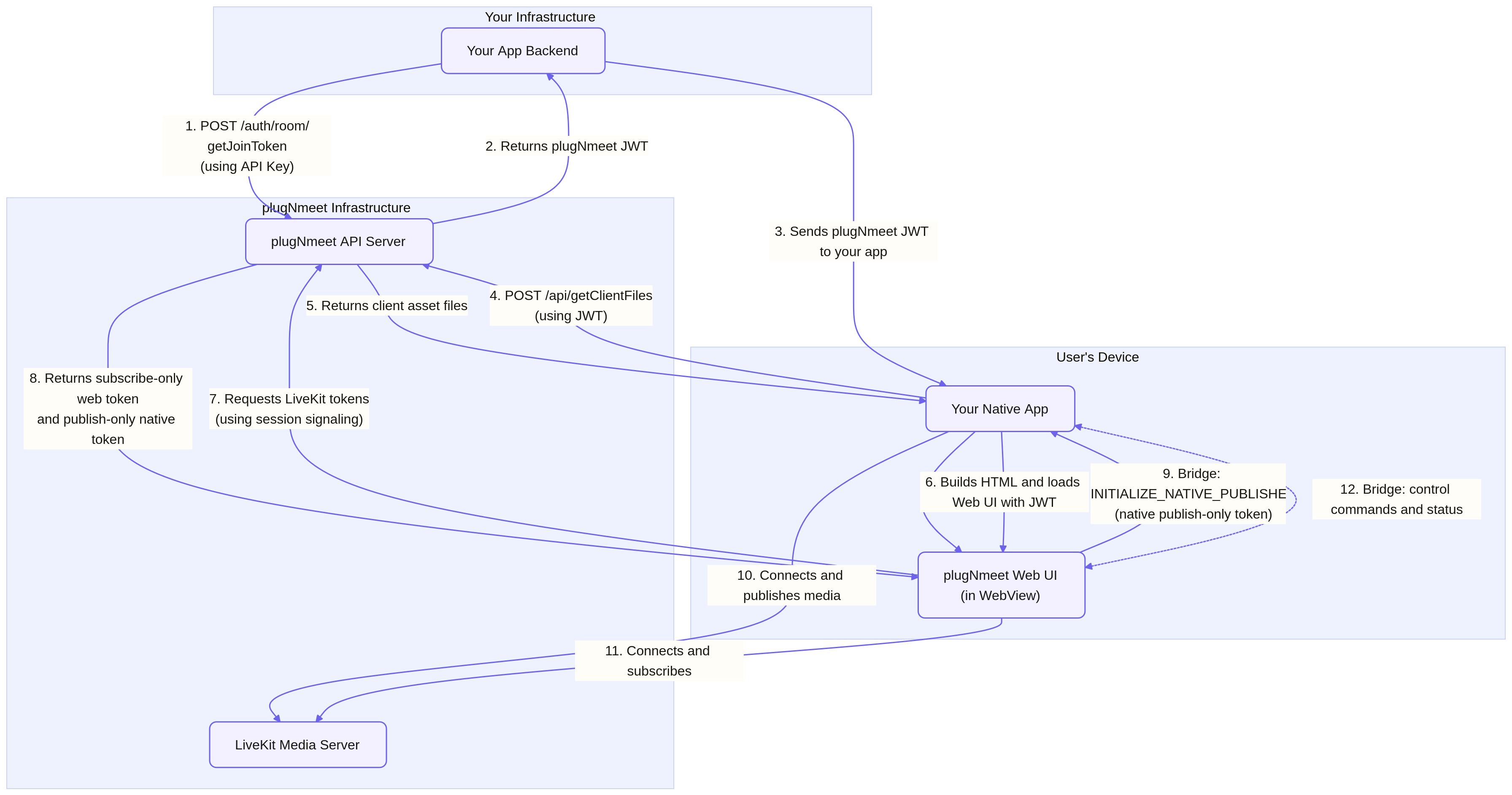
A lightweight communication "bridge" allows the web UI and the native code to communicate seamlessly. When a user taps the "Mute" button in the web interface, a message is sent across the bridge, telling your native code to mute the microphone. This architecture provides a seamless user experience while giving you the performance benefits of native code.
Get a Head Start on Your Custom Video App
While the official release is just around the corner, you can start building today. We believe in building in the open, and we're excited to see what our community creates.
Ready to build your own video conferencing app?
- Explore the Technical Guide for a deep dive into the architecture and API.
- Check out the Demo Apps on GitHub to see the pattern in action.
- Try the Live Demo to explore plugNmeet's features.
- Follow our Installation Guide to get your self-hosted server running.