Real-Time AI Avatars for Video Calls: What Changes for UX

Most AI assistants in a video call are invisible. They listen, take notes and hand you a summary afterwards, and the interface change is a panel, a transcript or a chat window. A real-time AI avatar asks for something else: the assistant becomes a participant on camera, and the call stops being "people plus text" and becomes "people plus someone who appears to be present".
In plugNmeet the avatar is an option on the voice session: the agent can speak by voice alone, or an avatar provider joins the room as a media participant and renders that speech as lip-synced video. The voice agent is still under active development, so read the rest as design guidance for the moment you test it.
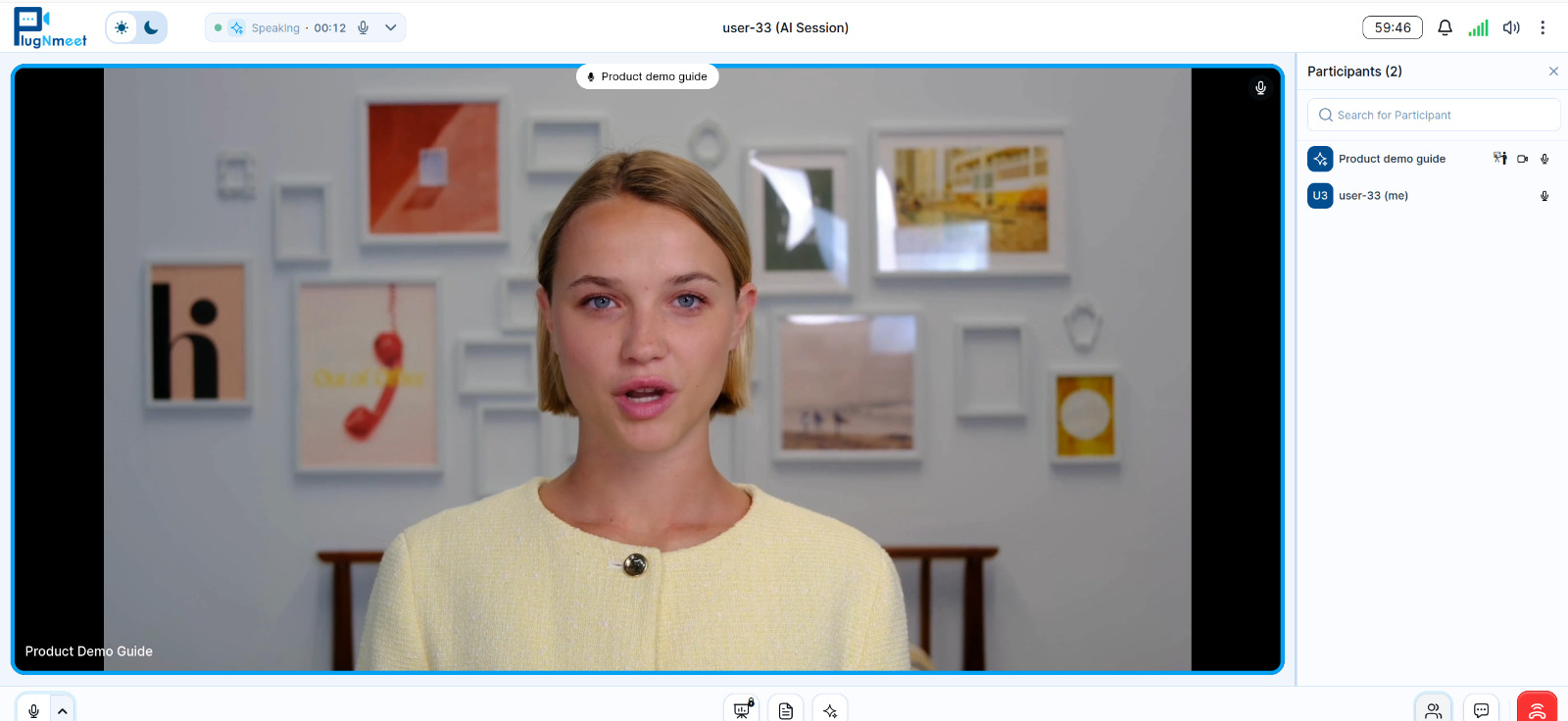
Visible presence changes the room before it changes anything else
Turn-taking in a call is mostly non-verbal: you read a face to see whether someone has finished or is about to speak. A voice-only agent gives you pauses instead, and participants learn to decode those pauses over a few minutes.
A visible avatar changes that decoding step: it may be easier to tell whose turn it is, and harder to treat the assistant as background. Both effects cut both ways. A face can lower the effort of following an explanation, or pull attention from the whiteboard and make a short answer feel like a performance. Whether it helps is something you measure in your own session — not something this article can claim for you.
Lip-sync and turn-taking: the avatar renders, it does not decide
The division of labour sets expectations. The voice agent runs the conversation, the tool calls and the whiteboard work. The avatar provider receives the agent's audio and returns video with matching mouth movement, joining as a normal media participant.
So the face is a renderer, not a second intelligence: it does not choose what to say, see your slide deck or study anyone's expression. Two consequences:
- Latency becomes visible. Voice hides a slow answer behind a pause that sounds like thinking; video shows it, and a sound-to-mouth mismatch reads as a glitch. Test on the network your learners actually use.
- Lip-sync may act as a turn cue — worth testing. A visible mouth closing might read as a clearer "I'm done" than a silent line. Whether a slight audio-video offset really changes how long people wait before speaking is something to observe in your own session.
Barge-in: interrupting is a design decision, not a feature bullet
Interruption is where an avatar earns or loses trust. In plugNmeet the agent stops speaking when a participant cuts in, and the avatar follows the audio, so the video does not finish a sentence over a real person. Socket-based renderers are also told when the agent is listening.
That matters more on camera than in audio. A voice talking over you is annoying; a face doing it is a social problem. When someone interrupts and the avatar stops, the silence reads as listening — and if your prompts push the agent to keep going, video makes that far more obvious than audio would.
Three places a face is worth the bandwidth
The agent works with one participant at a time — one conversation, one speaker — which is where a visible presenter fits:
- One-to-one tutoring. The learner has a single conversational partner, so a face gives the session a focal point while the whiteboard carries the explanation.
- Onboarding. Walking a new hire through a system is a sequence of short, repeatable steps — a script an agent can hold and a face can make less sterile.
- Product demos. An agent that opens, explains three things and stops is easier to follow than a narrated slide share, and it leaves the human for the parts that need one.
What it is not: a lecturer for a whole class. There is no class-wide talking avatar here, and the agent does not watch webcams or screen shares. Its visual context is the shared whiteboard and notepad, and the renderer receives the agent's audio rather than your camera. Reading the room, judging engagement or understanding sentiment is outside what this does. The AI agent overview and the in-room agent post cover the surrounding feature set.
Voice-only is a legitimate design choice
The avatar is optional — leaving it unset keeps sessions voice-only, which is the better answer when:
- The session is audio-first. A phone-like 1:1 call, or a learner on a locked-down device, gains little from a video track.
- You are guarding privacy. Voice-only avoids adding the avatar media participant, but it does not keep all agent audio on your server: the voice and LLM services you configure may still receive audio unless you point the agent at self-hosted providers. An avatar adds one more external participant, which is a real change to your data map.
- Bandwidth or budget is tight. Avatar minutes are metered separately, and a stuttering face is worse than no face.
- You want to skip the uncanny valley. Some learners find an animated head distracting, some reassuring. Neither is wrong.
- You already have a presenter. A recorded human intro plus a voice agent is coherent, and cheaper than rendering filler.
An avatar changes the interface, not the correctness of the session.
What the avatar changes about privacy, and what it costs
The avatar provider is an external media bot that joins with a scoped participant token, so three constraints follow directly:
- E2EE must be fully off. An external participant cannot hold your keys, so a room enabling an avatar is rejected while any E2EE mode is active, including server-managed encryption. Rooms where each participant inserts their own key cannot run the AI agent at all.
- Your server must be reachable from the internet, because the provider connects from its own network.
- The agent's audio leaves your server to be rendered into video. What the provider stores afterwards is governed by your contract with them, so read it before using this with a real class.
A bring-your-own avatar key and endpoint are stripped from room metadata, kept only in a room-scoped server record, and excluded from platform billing. Only tavus and livekit_datastream receive an automatic state-based hint: happiness while the agent state is SPEAKING and neutral at all other times. It follows the agent's runtime state rather than the speech, and it is not sentiment understanding — nothing is inferred from what the agent says or from participant audio. The security overview has the full picture.
Pricing keeps the same separation. Avatar video is billed per minute on its own line and never mixed into LLM token or audio usage, and each room can cap billable avatar minutes — set that beside your audio cap so both budgets end together. A room using its own provider key records the duration but no estimated cost. Setup lives in the avatar providers guide and server configuration.
Four questions before you turn the camera on
- Can a participant interrupt in the first thirty seconds, and does the face stop with the voice?
- Does the avatar help people follow the whiteboard, or compete with it?
- Would this session be worse as audio only? If not, skip the avatar.
- Which provider receives the audio, under what retention terms, and at what per-minute cap?
Start with one room
Give the avatar a job you can evaluate: one tutoring session, one onboarding walkthrough, one demo. Keep it short, try it yourself first, and watch whether participants address it as a presenter or ignore it as decoration. The second outcome is not a failure — it usually means the voice was enough. The avatar is a UX lever, not an outcome; engagement still comes from the design of the session around it.
Try it on your own server. Read the AI agent docs, add your own provider keys, and follow the avatar providers guide. The public live demo shows the meeting platform only — the AI agent and real-time avatars are not part of it.